Floral Wedding Invitation Card Template: Editable & Printable
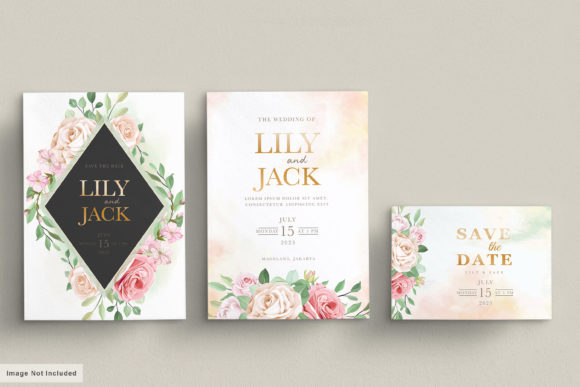
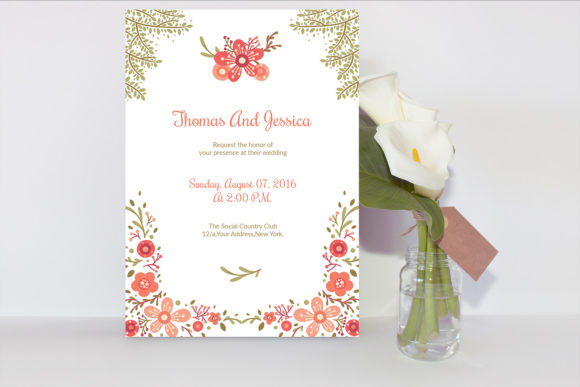
Planning a wedding involves balancing aesthetic vision with practical budget constraints. For couples, designers, and event planners seeking professional stationery without the custom design price tag, a floral wedding invitation card template offers an ideal middle ground. This specific 5×7 inch editable resource bridges the gap between high-end bespoke stationery and generic store-bought cards by providing fully layered files for both Microsoft Word and Adobe Photoshop. The utility lies in its dual-format accessibility, allowing users to choose their preferred editing environment while maintaining a cohesive, botanical aesthetic that suits everything from rustic garden parties to modern minimalist ceremonies.
Dual-Format Flexibility for Diverse Skill Levels
The primary advantage of this printable floral wedding invitation template is its inclusivity regarding technical skill. Not every bride, groom, or freelance designer possesses advanced proficiency in Adobe Creative Cloud. By including an MS Word 2007-2013 DOCX file alongside a Photoshop CS6 PSD file, the template democratizes access to professional layout design.
For users comfortable with Photoshop, the PSD file offers granular control. You can manipulate individual floral layers, adjust color grading to match specific Pantone swatches, or apply texture overlays to the background. This level of depth is essential for designers who need to integrate the invitation into a broader branding suite that includes menus, place cards, and thank-you notes. Conversely, the Microsoft Word version serves those who prefer a familiar interface. Text replacement in Word is intuitive, reducing the learning curve significantly. While Word has limitations regarding layer management compared to Photoshop, it handles typography and basic image placement effectively for straightforward customization. This flexibility ensures that whether you are a marketing professional creating a portfolio piece or a couple managing your own nuptials, the workflow remains efficient.
Adapting Botanical Aesthetics Across Wedding Styles
Floral motifs are perennial favorites, but execution determines relevance. A floral wedding invitation card template must be versatile enough to transcend a single genre. When working with this 5×7 inch format, consider how color manipulation shifts the entire mood of the stationery.
- Romantic and Soft: Utilize pastel pinks, sage greens, and cream backgrounds. Increase the brightness and lower the contrast in Photoshop to create a dreamy, ethereal quality suitable for spring weddings.
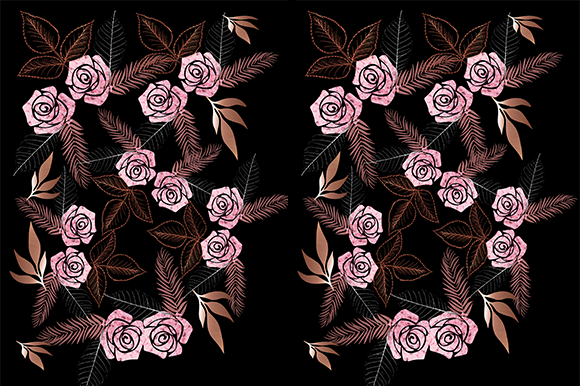
- Moody and Dramatic: Shift the floral hues toward deep burgundies, navys, or charcoal. Pair these with dark backgrounds and metallic gold or copper text. This approach transforms a standard floral template into something appropriate for evening receptions or autumn events.
- Modern Minimalist: Isolate the floral elements against ample white space. Reduce the saturation of the flowers slightly to prevent them from competing with the typography. This creates a clean, editorial look that appeals to contemporary sensibilities.
- Vintage Heritage: Apply a sepia or warm photo filter over the entire composition. Select serif fonts that evoke historical typefaces. This adaptation works exceptionally well for heritage venue weddings or couples incorporating family traditions.
By treating the included graphics as raw assets rather than fixed decorations, you extend the lifespan and utility of the template far beyond its default state.
Typography and Layout Best Practices
A common pitfall when using editable templates is neglecting typographic hierarchy. The help file includes download links for the specific fonts used in the original design, which is a critical feature for maintaining visual integrity. However, simply installing the font does not guarantee a professional result. Effective communication requires structured information architecture.
When editing the 5×7 inch canvas, prioritize readability over ornamentation. The names of the couple should typically serve as the primary focal point, utilizing the largest font size or most decorative typeface. Secondary details—date, time, and venue—require high legibility and should often be set in a complementary sans-serif or simple serif to balance the ornate florals. Tertiary information, such as RSVP details or dress codes, should be smaller still. In Microsoft Word, utilize paragraph spacing and alignment tools rigorously; avoid using the spacebar or return key to position text, as this leads to formatting errors during printing. Instead, use text boxes and table structures to anchor elements precisely. In Photoshop, leverage guides and smart objects to ensure text remains centered and margins remain consistent across all copies.
Technical Considerations for Professional Printing
Digital perfection does not always translate to physical media. Whether you are printing at home or using a professional service, understanding file specifications prevents costly reprints. This template’s compatibility with Photoshop CS6 and newer versions ensures support for CMYK color profiles, which is mandatory for accurate print reproduction. RGB colors viewed on screen often appear duller when printed; converting your final design to CMYK before exporting allows you to correct color shifts proactively.
Paper selection also influences the final perception of a floral wedding invitation card template. Heavier cardstocks (80lb to 110lb cover weight) provide the tactile substance expected of wedding stationery. If the template features watercolor-style florals, matte or textured paper stocks enhance the organic feel. Glossy papers can sometimes make digital florals appear artificial. Additionally, verify bleed settings. Although the file is sized at 5×7 inches, professional printers often require a 1/8-inch bleed area to trim accurately without leaving white borders. Check if the PSD includes bleed guides; if not, add them manually before sending to production.
Creative Extensions Beyond the Invitation
Savvy creators and small business owners recognize that a single template asset can anchor an entire product line or event suite. The floral elements included in this package can be extracted and repurposed to maintain brand consistency. For entrepreneurs selling stationery on platforms like Etsy, this template serves as a foundational base that can be modified into matching response cards, reception signs, or envelope liners. By altering the crop and rearranging the botanical assets, you create distinct products from a single source file, maximizing return on investment.
For personal use, consider adapting the 5×7 inch layout for digital distribution. In an era where many guests prefer electronic communication, export a flattened JPEG or PNG version optimized for mobile viewing. The vertical aspect ratio of this template aligns perfectly with smartphone screens, making it ideal for email invitations or private wedding website headers. This hybrid approach allows couples to send physical keepsakes to close family while managing logistics digitally for distant guests, all while maintaining a unified visual identity derived from the same affordable template resource.
Streamlining the Customization Workflow
Efficiency matters, especially when deadlines loom. Before beginning edits, organize your content. Have all spelling-verified text ready in a separate document to avoid typing directly into the design software, which increases the risk of errors. Open both the Word and PSD files to assess which platform better suits your specific modification needs. If you only need to change names and dates, Word is likely faster. If you need to recolor flowers or move graphic elements, invest the time in Photoshop.
Save iterative versions of your work rather than overwriting the original master file. Naming conventions like "Invitation_v1," "Invitation_ColorAdjust," and "Invitation_Final_Print" protect against accidental data loss and allow you to revert to previous states if a design direction fails. Finally, always print a physical proof at actual size before committing to a full batch. Screen resolution masks alignment issues and color discrepancies that become glaringly obvious on paper. This disciplined approach ensures that the affordability and ease of use promised by the floral wedding invitation card template translate into a polished, professional final product that honors the significance of the occasion.